Chop A Forest Beginner Guide: Cutting and Selling
Complete your first Chop A Forest log sales, choose an early tool, reduce carrying trips, and understand the documented solo and friend save boundary.
Start near the selling area: fell a tree, gather its logs, sell them, and use the proceeds for an early tool. Expand carrying and transport when those stages become the delay.
View reference image
On this page
Your first goal is one complete sale
Chop A Forest asks you to clear a forest, but the first useful checkpoint is much smaller: fell a tree, collect its logs, sell them, and turn the proceeds into a tool. The official Roblox listing confirms that loop. You do not need a rare class or a paid item to understand it. Work close enough to the selling area that a full inventory sends you on a short return trip.
This guide combines that official description with NoobBlox’s recorded opening and VendoPlus’s short introduction. Those are public recordings, not our own playtest. Shop prices, capacities, menus, and tree balance can change. Use the decision process below with the values actually displayed in your session rather than expecting an old recording’s numbers to remain exact.
Locate the sale route before cutting widely
Before heading deep into the trees, identify the log-selling area and the route back to it. In the recorded opening, logs go into the selling machinery and money appears as the logs are processed. This means the sale point is part of the work loop, not simply a shop you visit occasionally. Learn where to deposit logs and where to collect the resulting money before creating a large pile elsewhere.
Choose a nearby tree for the first cycle. Keep the selling area in sight if possible. The important observation is where the felled tree’s logs land and how you pick them up. A tree falling is only the first stage of progress: wood left on the ground has not yet funded your next purchase. Return with a manageable load, deposit it, and verify that you can access the money from the sale.
Do not assume a universal keyboard shortcut from someone else’s PC footage. Follow the interaction prompts your device displays. The video introductions show the actions and sequence; they do not establish a tested control scheme for every phone, tablet, controller, and keyboard configuration.
Learn the difference between cutting and collecting
In the source recordings, a tree takes repeated attacks before it falls and produces logs. There is a short gap between felling and collecting the resulting wood. If you are waiting on one tree to finish falling, another nearby tree may be a sensible next target. Keep your work area compact, however. A scattered field of logs can create more travel than the extra cutting saves.
For the first few sales, deliberately complete the full chain rather than continuously attacking new trees. That gives you a clear answer to four questions: how long does a tree take, how quickly does your inventory fill, how long is the selling trip, and how long does processing take? You can then choose a purchase that addresses the slowest stage you actually experience.
Avoid treating every tree as identical. The recordings show different tree names and cutting requirements, but this site does not publish a complete tree table or a value ranking. If a tree seems much slower, compare the visible effort and resulting sale in your own run before making it your default target. A colorful tree is not evidence of a confirmed drop rate or guaranteed profit.
Move from the starter attack to an early tool
NoobBlox’s opening buys an axe after the first earnings, then returns to cutting. The official listing also explicitly names buying and upgrading tools. An early tool purchase is therefore a supported progression step. Check what it changes in your current shop and compare the result on a familiar tree. You are looking for a practical improvement in getting logs ready for collection.
Do not empty every coin into whatever upgrade is nearest. Once cutting becomes comfortable, your next limitation may be carrying capacity or the trip home. If you can fell trees quickly but must leave after gathering only a small share of the wood, increasing cutting speed again will not solve that travel problem. Our tool and upgrade guide explains that distinction in more detail.
A useful first-session target is a working tool plus a repeatable sale route. You can stop there to learn the map before planning a long run. There is no verified universal purchase order here that promises a specific completion time.
Use carrying capacity to reduce repeated trips
The recorded beginner route adds a backpack after the axe. Its purpose is straightforward: more room for logs lets you collect more before returning to sell. The current capacity shown by your game matters more than an old narration’s totals. In the available footage, the narrator describes backpack capacity in more than one way, so this guide deliberately avoids publishing a definitive starting capacity or an additive-capacity formula.
Watch what makes you leave your cutting area. If your inventory fills while plenty of felled logs remain nearby, a carrying upgrade has an obvious job. If you are returning because no logs are ready, the bottleneck is somewhere else. Make a purchase after you can identify the delay it removes. This prevents an attractive upgrade icon from replacing a decision about your actual work.
Keep enough attention on unloading. Once your carrying space is full, continuing to cut can be productive only if you have a clear collection plan. A pile beside the sale point is different from a pile far away behind several other trees. Finish an orderly pickup and delivery cycle before expanding the work area again.
Keep the selling machinery working while you cut
The NoobBlox recording shows the chipper processing a batch while the player returns to work. That creates a useful overlap: you can cut or collect while previously delivered wood is being sold. It does not establish an unlimited queue, a fixed processing rate, or offline income. Stay within what you can observe in the current session.
If processing is visibly backed up, first check whether money still needs collecting and whether your next trip will arrive before the queue clears. A chipper-speed purchase may help a persistent backlog. If the machinery is already finished whenever you return, faster processing may add less value than better cutting or transport. You do not need a spreadsheet to notice that difference.
Use a simple rhythm: deliver wood, check the sale, make the chosen purchase, and return to a compact cutting area. Once that feels routine, trucks and collection tools become easier to judge because you have a baseline to compare against.
Expand outward when transport justifies it
The recordings show a truck used to move logs from farther away after nearby trees have been cleared. This is an expansion tool, not a reason to abandon an efficient nearby patch immediately. A vehicle adds driving, loading, and unloading to the loop. Those actions earn their place when they replace enough repeated walking.
Before buying or spawning a truck, identify where you will park at the trees and where you will unload. You should know both ends of the route. Start with an easy trip rather than the farthest location you can see. Read the truck and log transport guide when distance becomes the main delay.
Finish a session with a clear next step
The official listing says solo and friend runs save. That confirms a save feature, but it does not explain every host, party, reconnect, or shared-inventory rule. Do not assume a friend’s progress and your own progress are interchangeable. Note the run you entered, the equipment you purchased, and the stage you want to resume before leaving.
For your next session, choose one concrete objective: improve cutting, reduce carrying trips, or establish a truck route. Return to the guide hub for the matching task. Classes, mutations, codes, and completion rewards need separate verification; none is a prerequisite for learning the documented cut, collect, sell, and upgrade loop.
Official game media
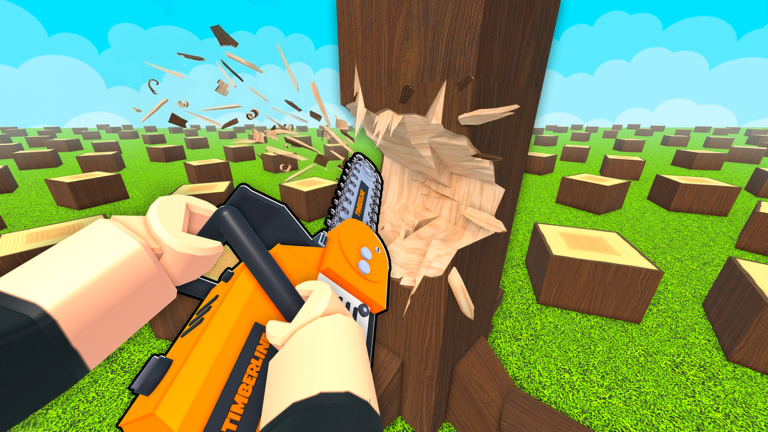
Official Roblox promotional artwork by WCT Capital. This image illustrates the game identity, not a tested gameplay instruction. Rights remain with the respective owners; editorial reference with attribution. Official source. For rights questions, contact linming7277@gmail.com.
Step-by-step guide
- Complete a first sale
Fell a nearby tree, collect its logs, deliver them to the selling machinery, and verify that the resulting money is available.
- Improve the slowest stage
Inspect whether cutting, collection, carrying or processing dominates the next trip before choosing an equipment purchase.
- Expand the route deliberately
Work nearby while learning the loop, then establish a truck route when longer return journeys become the main delay.
Video evidence
Watch creator walkthroughs alongside this guide. Check the recording date before following requirements that may have changed.
Chop A Forest Guide! (Codes, COMPLETE FAST, Tips & Tricks, Best Class Tier List, & MORE) ROBLOX
A recorded opening covers the axe, backpacks, tool upgrades, truck loading, vacuum and chipper workflow. Creator observations are dated evidence, not our own playtest.
How to Play Chop A Forest Roblox Full Guide
A shorter introduction shows a solo entry, early tree cutting, log selling and the upgrade menu. Use current on-screen prompts for your device.
Sources
Recheck these links whenever the game version, release status, or strategy changes.
- Chop A Forest — official Roblox listing WCT Capital; official cut, collect, sell, tool and save description. Checked 16 October 2026.
- NoobBlox — recorded beginner and equipment route Creator gameplay. Metadata upload date is 14 October 2026; the search index labels it 15 October. Native metadata is used here.
- VendoPlus — recorded first-session introduction Creator gameplay; upload date 13 October 2026 from yt-dlp metadata.